The KODAK Step Instant Photo Printer turns selected phone photos into compact prints for journals, collages, lockers, and other personal projects.
This KODAK Step Instant Photo Printer review looks at its portable, ink-free design and the tradeoffs of its small sticky-backed format.
KODAK Step Printer Review Summary
The quick verdict
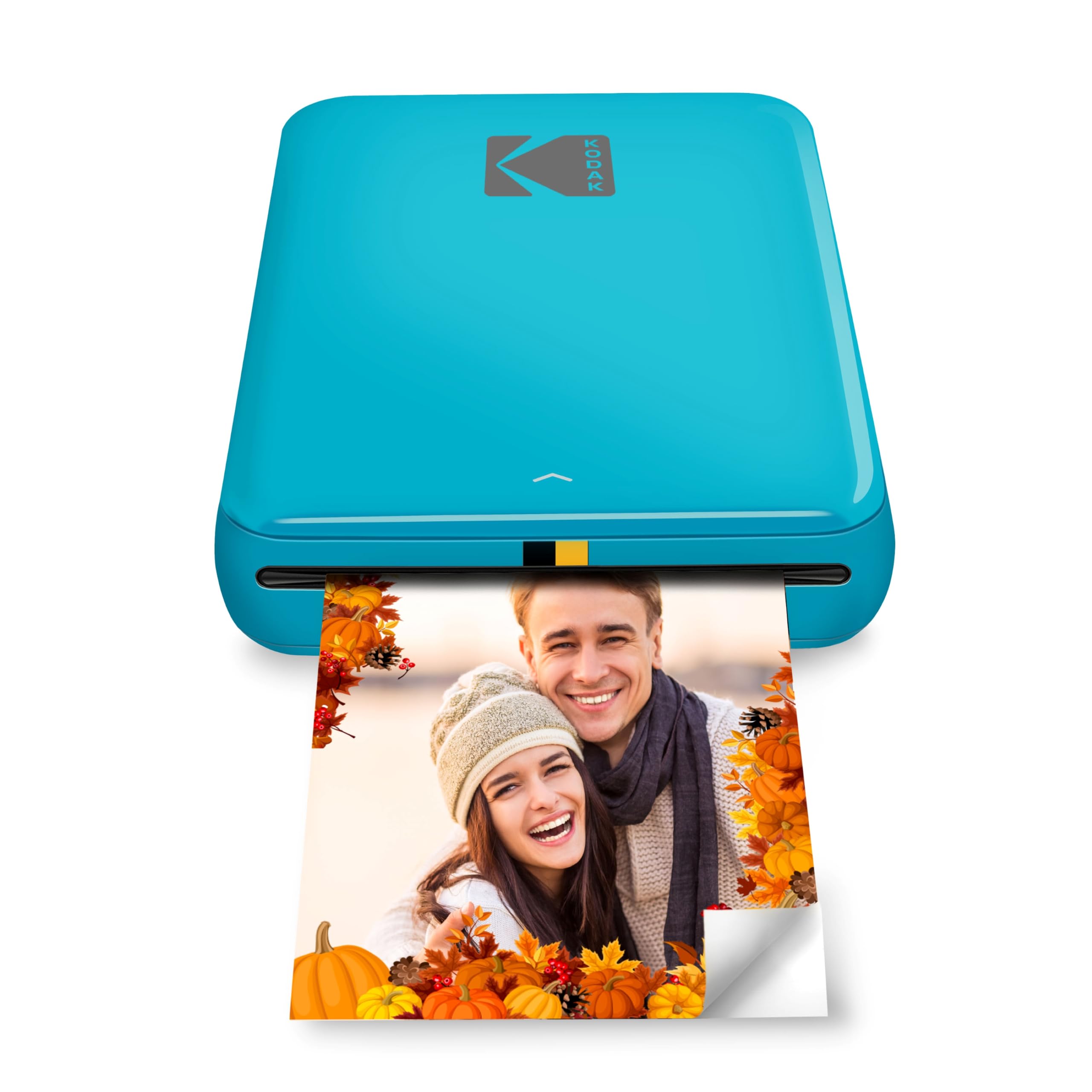
20,000+ ratings
Read Amazon ReviewsKODAK Step Instant Photo Printer
A compact option for phone photographers and crafters who want small, peel-and-stick color prints with app-based editing.
- Prints 2-by-3-inch color photos on ZINK paper with embedded dye crystals.
- The paper has a sticky back, making prints usable as small stickers or decorations.
- Connects to iOS and Android devices over Bluetooth or NFC.
- The KODAK app offers collage creation and customization tools, including filters, borders, stickers, and text.

Pros
- Portable design and built-in battery suit travel, events, and crafting sessions.
- Adhesive-backed prints are ready to place in journals, on lockers, or in collages.
Consider before buying
- The 2-by-3-inch print size is better for small keepsakes than for larger display photos.
- The battery’s stated capacity of up to 25 prints may require planning for longer sessions.
Read the full review summary
The Step is built around convenience: pair a compatible iOS or Android device over Bluetooth or NFC, edit photos in the KODAK app, and print onto 2-by-3-inch ZINK paper.
Its palm-sized, under-one-pound body and built-in rechargeable battery make it suited to casual projects away from a desk, while the adhesive backs let prints double as decorations.
Its appeal is strongest for people who value quick, playful physical copies over larger prints or a traditional photo-printing workflow.
The app’s collage, filter, border, sticker, and text tools support personalization, and the ink-free system avoids separate ink cartridges, toner, or ribbons.
Buyers should keep in mind that prints are small and that the stated battery capacity is up to 25 photos per full charge.
The buying factors
KODAK Step Printer Scorecard
Editorial scores reflect listed features and buyer fit; they are not laboratory measurements or customer ratings.
Portability
Palm-sized construction, weight under one pound, and a rechargeable battery are well suited to casual travel and crafting.
Phone connectivity
Bluetooth and NFC support connections with iOS and Android devices, offering flexible ways to send photos.
Creative editing
The app includes tools for collages, filters, borders, stickers, and text before printing.
Print versatility
Small adhesive-backed prints suit decorative uses, but the 2-by-3-inch format is specialized.
Ink-free convenience
ZINK paper uses embedded dye crystals, so the workflow does not require separate ink, toner, or ribbon supplies.
Battery capacity
Up to 25 prints on a full charge should cover a modest outing, though frequent sessions may call for recharging.
Key Features and Specifications of KODAK Step Printer
- Prints 2-by-3-inch color photos on ZINK paper with embedded dye crystals.
- The paper has a sticky back, making prints usable as small stickers or decorations.
- Connects to iOS and Android devices over Bluetooth or NFC.
- The KODAK app offers collage creation and customization tools, including filters, borders, stickers, and text.
- Palm-sized design weighs less than one pound for carrying between projects.
- Built-in rechargeable lithium-ion battery is rated for up to 25 photos on a full charge.
- The paper is described as resistant to moisture, rips, tears, and smudges.
Pros and Cons of KODAK Step Printer
Pros
- Portable design and built-in battery suit travel, events, and crafting sessions.
- Adhesive-backed prints are ready to place in journals, on lockers, or in collages.
- App editing gives users several ways to personalize an image before printing.
- ZINK printing avoids the need to handle separate ink cartridges, toner, or ribbons.
Consider before buying
- The 2-by-3-inch print size is better for small keepsakes than for larger display photos.
- The battery’s stated capacity of up to 25 prints may require planning for longer sessions.
- The workflow depends on a compatible phone or tablet and the KODAK app.
Who Should Buy KODAK Step Printer?
Good fit
Consider the Step if you want a small printer that turns phone photos into physical mementos without setting up a conventional printer.
Bluetooth and NFC connectivity provide options for pairing, while the app gives you room to crop and decorate images with collages, filters, borders, stickers, and text.
It is especially appealing for journaling, scrapbooking, party favors, and informal creative projects. Because the paper is adhesive-backed, you can add prints directly to a notebook or collage without needing a separate adhesive step.
The compact body and rechargeable battery also make it easier to bring the printer along than a desk-sized photo printer.
Think through your typical print session before buying: the battery is rated for up to 25 photos per charge, and the output is limited to a small 2-by-3-inch format.
Check that your device supports the app and connection method you plan to use, and consider whether adhesive-backed prints fit the way you want to display or store photos.
Who should skip it
Skip it if you primarily want larger photographs for frames or a broad range of print formats. Its 2-by-3-inch sticky-backed paper is designed around compact, decorative keepsakes.
It may also be a poor match if you need a printer for long, high-volume sessions away from charging. The stated maximum of up to 25 photos per full charge is more suited to smaller batches.
How the KODAK Step Printer Fits Creative Photo Projects
Small prints for hands-on projects
At 2 by 3 inches, the output is easy to incorporate into a journal, scrapbook, collage, or decorated surface.
That size encourages collecting and arranging snapshots rather than creating prominent framed pictures, so it suits projects where the physical print is part of a page or display.
A direct phone-to-paper routine
Bluetooth or NFC connectivity and app-based editing keep the workflow centered on a mobile device.
You can select an image, personalize it, and send it to print without routing the project through a computer, which is convenient when choosing photos during an outing or group activity.
Ink-free printing and paper choice
ZINK technology uses dye crystals embedded in the paper, eliminating separate ink, toner, or ribbon supplies.
The paper’s adhesive backing adds a creative use, though buyers should plan around the specified ZINK format and check paper compatibility when replenishing supplies.
Battery planning for outings
The built-in rechargeable battery is rated for up to 25 photos on a full charge.
That gives a useful planning reference for a small batch, but print needs vary; if you expect to produce many keepsakes in one session, charge the printer beforehand and consider how often you will want access to power.
Alternatives to KODAK Step Printer
Portable Photo Printers alternative

25,000+ ratings
Read Amazon ReviewsHP Sprocket Select
Choose the KODAK Step if its smaller format and up-to-25-print battery capacity suit your projects. Consider the HP Sprocket Select if you prefer a larger print area or want its social-media tag-to-print workflow.
- The HP Sprocket Select prints larger 2.3-by-3.4-inch ZINK photos and offers app editing tools, including frames and filters, plus a hashtag-based tag-to-print feature for social photos.
- The KODAK Step makes compact 2-by-3-inch adhesive-backed prints and emphasizes portable phone printing.
Portable Photo Printers alternative
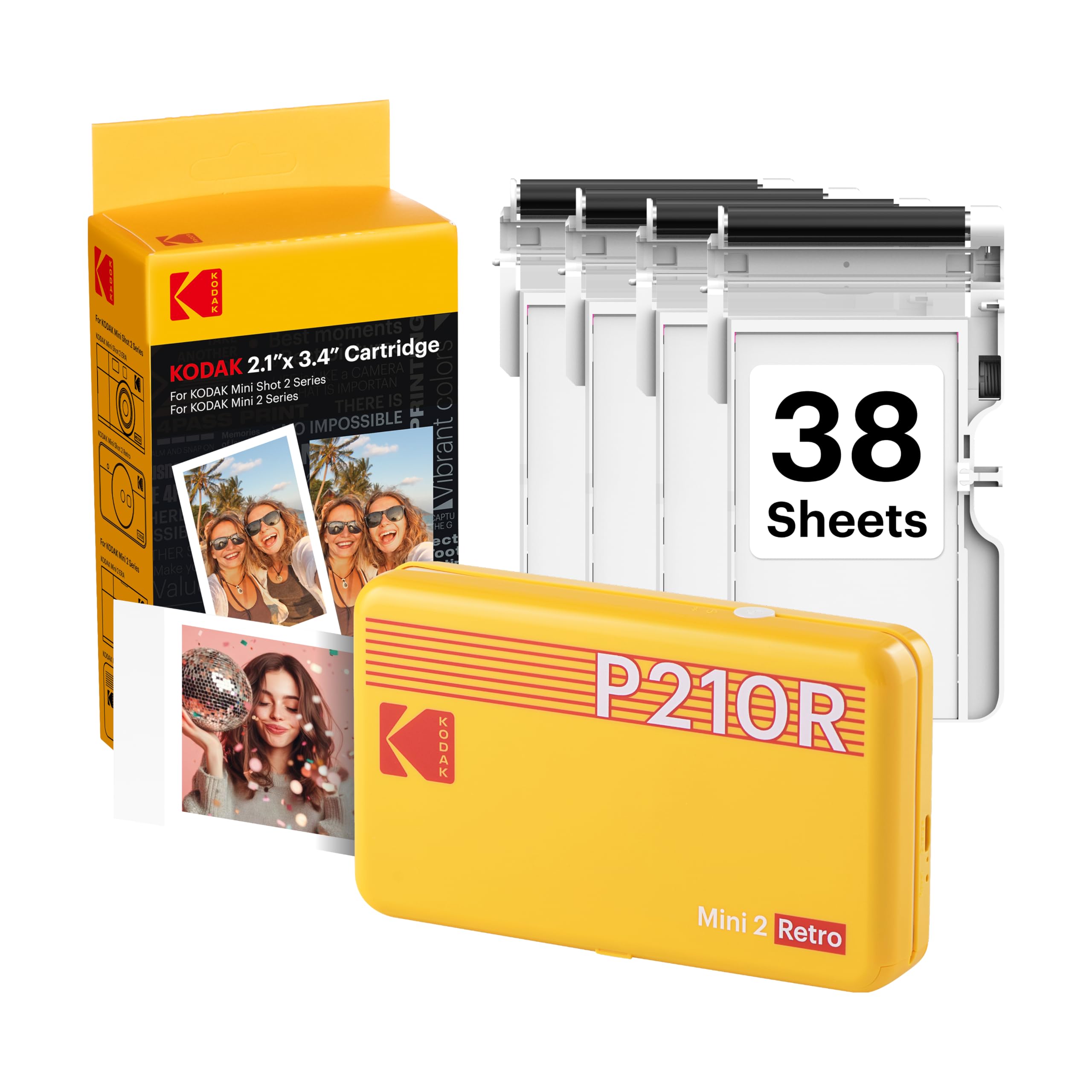
12,000+ ratings
Read Amazon ReviewsKODAK Mini 2 Retro
The Step is a better fit for buyers who want peel-and-stick prints and an ink-free paper system.
The Mini 2 Retro is worth considering if you prefer its 4PASS process and included paper-and-cartridge bundle, and do not need adhesive-backed output.
- The KODAK Mini 2 Retro uses 4PASS dye-sublimation printing on 2-by-3-inch paper.
- Its bundle includes four cartridges and 38 sheets, and the product description gives an approximate 55-second print time.
- The KODAK Step uses adhesive-backed ZINK paper and connects to iOS or Android devices over Bluetooth or NFC.
Is KODAK Step Printer Worth It?
The KODAK Step Instant Photo Printer is worth considering for phone photographers, scrapbookers, and crafters who want portable 2-by-3-inch prints they can peel and stick.
Its app editing tools, phone connectivity, rechargeable battery, and ink-free paper system make it a convenient fit for small creative projects.
Buy it if compact keepsakes are your goal and the stated battery capacity suits your typical sessions. Look elsewhere if you need larger prints or a different printing process; those needs matter more than the Step’s portability.
Your review at a glance
20,000+ ratings
Read Amazon ReviewsKODAK Step Instant Photo Printer
A compact option for phone photographers and crafters who want small, peel-and-stick color prints with app-based editing.
- Prints 2-by-3-inch color photos on ZINK paper with embedded dye crystals.
- The paper has a sticky back, making prints usable as small stickers or decorations.
- Connects to iOS and Android devices over Bluetooth or NFC.
- The KODAK app offers collage creation and customization tools, including filters, borders, stickers, and text.